
Quiz
Page actions
 Open in ChatGPT
 Open in Claude
Couldn’t copy. Open the Markdown to copy it manually.
Skip quiz questions based on answers
Use conditional logic to jump to a question, skip one, or end a quiz early.
Use Conditional Logic to show shoppers different questions based on what they’ve answered.
| Rule action | When the rule matches |
|---|---|
| Jump to question | Shoppers go straight to a later question. |
| Skip question | Shoppers continue in order, skipping the selected question. |
| End quiz | Shoppers finish the quiz early. |
- Open Questions in your quiz.
- Add at least two questions, including a Single choice question with an answer or a Text input question.
- In Conditional Logic, click Add Rule.
- Under When, choose a question and the answers to check.
- Choose what happens when the condition matches.
- Click Save changes.
- Preview the quiz and try a path that matches the rule and one that does not.
This rule skips “What style do you like?” when the shopper picks “A gift.”
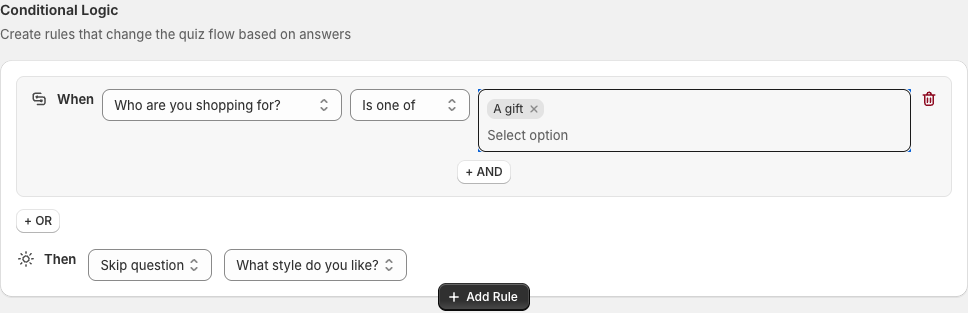
Use + AND when conditions must match together. Use + OR when either group can match. For example, use AND when a rule needs both “A necklace” and “A gift.”
Common troubleshooting
A question never appears
Check which rules jump past it or end the quiz early.
The quiz loops
Change the jump target so it moves shoppers forward.