
Quiz
Page actions
 Open in ChatGPT
 Open in Claude
Couldn’t copy. Open the Markdown to copy it manually.
Test quiz recommendations before going live
Preview a quiz with sample products or run a Playground test with real recommendations.
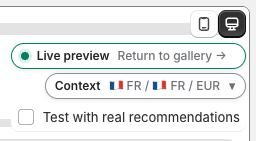
Use Live preview to take the quiz before showing it to shoppers. Turn on Test with real recommendations when you want to check the products the quiz picks.
Context sets the country, currency, and language shown in the preview. Real recommendation tests use the United States, your store’s currency, and the quiz’s default language. To check recommendations for a specific market, take the quiz on your storefront in that market.
- Open Placement in your quiz.
- Save the placement if it is new or has unsaved changes.
- Click Open editor on the placement.
- Click See live in the preview toolbar.
- Choose the kind of test you need.
- Leave Test with real recommendations off. Pick this when you want to check questions, branching, or the results layout with sample products.
- Turn Test with real recommendations on. Pick this when you want to check actual product picks.
- Take the quiz with the answers you want to test.
Real tests appear in the Playground view of quiz submissions. They don’t count toward billable quiz usage. Your store can run up to 20 real tests per hour and 60 per 24 hours.
If you reach a test limit, use sample products to check the quiz layout or wait for another real test slot.