
Quiz
Page actions
 Open in ChatGPT
 Open in Claude
Couldn’t copy. Open the Markdown to copy it manually.
Guide quiz recommendations with product filters and rules
Use optional product filters or manual rules to guide quiz recommendations.
By default, the quiz can consider your whole catalog. Brandye still checks availability before showing results. Product filters and manual matching rules are optional.
Limit the product pool
In your quiz, open Recommendation and find Recommendable products. Choose the filters you need.
- Include Products. Pick this when the AI should start with a smaller set of products. Open Configure inclusions and use Select collections or Add tag. A product can match any included collection or tag. Shoppers may still see products outside your inclusions or their budget. Use Exclude Products to keep specific products out of all results.
- Exclude Products. Pick this when products should stay out of all recommendations. Open Configure exclusions and select the collections or tags to exclude. Exclusions take precedence over inclusions.
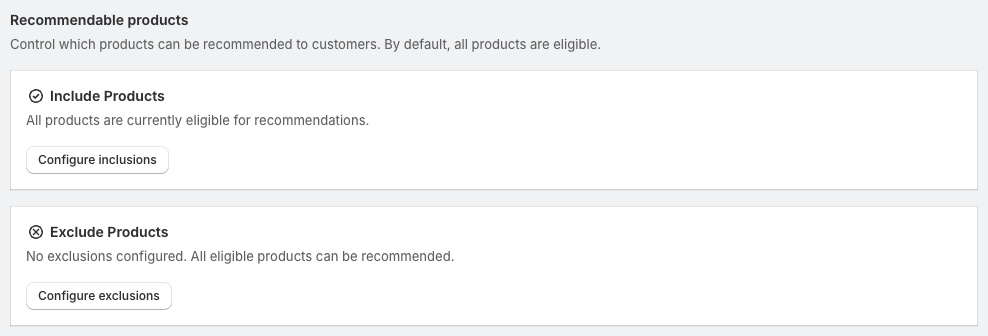
Click Save changes. Allow time for the changes to appear before you test recommendations.
Recommend specific products for an answer
Use a manual matching rule when you want to suggest particular products for a shopper’s answers.
- Under Manual Matching (optional) in Recommendation, click Add Rule.
- Under When, choose a question and the answers to match.
- Under Then recommend, click Select Products.
- Select the products and variants you want the rule to suggest.
- Click Save changes.
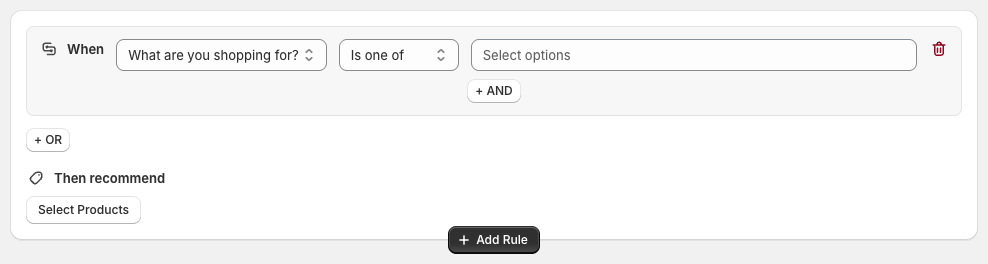
Use + AND when conditions must match together. Use + OR when either group can match.
A product that is draft, archived, unlisted or deleted in Shopify shows a yellow label next to its name, such as Draft. Shoppers never get it. Make it active in Shopify, or select another product.
Test real recommendations with the answers you expect to match. For details on what affects quiz results, see how the quiz picks products.
Common troubleshooting
An unwanted product appears
Check the tag or collection under Exclude Products, then test again.
A product from a manual rule is missing
Check that the product has no yellow label under Then recommend, that the answers match the rule, and that the selected variant is available.