
Analytics
Page actions
 Open in ChatGPT
 Open in Claude
Couldn’t copy. Open the Markdown to copy it manually.
Read your results in Analytics
Open the quiz or chat report and choose metrics for the question you want to answer.
Brandye has one Analytics report for quizzes and another for conversations from the AI Shopping Assistant and Product Questions block. Choose a date range for the activity you want to review.
Quiz results
Open Quizzes → Analytics and choose a date range. The report covers all your quizzes until you choose one in Filter. Use Daily quiz submissions for completed submissions and Quiz Completion Rate to see how many tracked quiz sessions answered each question. Quiz-to-order rate divides attributed orders by submissions in the selected period. An order in that period can be linked to a submission from an earlier period.
The quiz revenue overview and a quiz’s answers, journey funnel, recommended products, and completion rate support ranges of up to 90 days. For answers, quiz paths, and the most recommended products, see how to read your quiz’s results.
Chat results
- In Brandye, open AI Product Questions.
- Under Insights, open Analytics.
- Choose a date range.
- Open Filter to narrow the report by Source or Language, if needed.
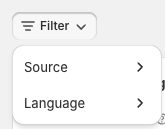
For example, choose Product question clicked under Source to find conversations that contain a question clicked on a product page. A matching conversation can also contain questions the shopper typed.
| To see | Read |
|---|---|
| How much shoppers used chat | Sessions, Conversations, and Questions. One session can contain several conversations, and one conversation can contain several questions. |
| How often chat sessions were followed by an order | Session-to-order rate. See how Brandye counts revenue for which orders qualify. |
| How shoppers asked questions | Questions by source, which separates typed questions from suggestions shoppers clicked and other ways they interacted. |
| Which products shoppers bought after a recommendation | Bought after in the recommendation table. The section appears once at least 30 matching conversations contain a recommendation. |
If you see Not much data yet, read the rates with care. Broaden the date range or clear filters to see more conversations. To inspect individual questions and replies, open Conversations.